

This is the third article in the Operations series.
By Corey Mobley, internal communications student assistant
At Georgia Gwinnett College, all faculty and staff must submit event and space reservation requests through 25Live, the college’s system for managing campus spaces, to ensure Operations and Space Management can properly review, schedule and accommodate the request.
The Space Steering Committee reviews and approves space requests for office moves, classroom capacity changes, furniture, storage or other space-related needs. Faculty and staff may submit these requests through the Employee Resources Team Operations channel under Space Management (login required) instead of 25Live. For additional information, contact jsimpson23 [at] ggc.edu (Jennifer Simpson), associate director of business operations.
Steven Sattler, campus scheduling administrator, discusses the importance of 25Live and how to ensure campus events receive support.
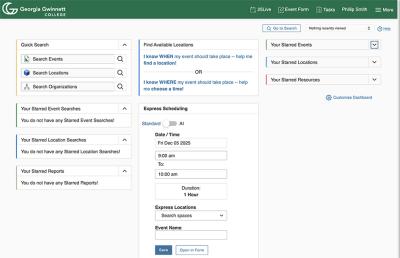
“If an event is not scheduled in 25Live, the college will not officially recognize or support it, which creates liability for organizers,” Sattler said. “Reserving space for events through 25Live ensures the event is approved, prioritized and eligible for campus support.”
When submitting requests, Sattler encourages faculty and staff to include an accurate description of the event, capacity and correct contact information so the setup team can contact the right person, if needed. A detailed layout is also essential because without it, delays occur with the full reservation process.
Submitting event requests in advance is crucial to the Operations team.
“Our policy states that all campus events require at least five business days’ notice. Event planners who require tables, chairs, a stage, microphones or IT assistance must submit requests at least 10 business days in advance,” Sattler said.
How to submit an event in 25Live
Access 25Live
- Access 25Live by going to the Communications Request webpage, scroll down to the “Choose Your Request Type” section and select either “Event with Location” or “Event/Announcement without Location.”
Complete the form
- For an event with a location, click “Event Form” in the top right corner and complete the guided form. The pop-ups may seem excessive, but they are there to help guide users through the process.
- For an event or announcement without a location, fill in the appropriate boxes.
Submit request
- Once the event has been requested, it then gets routed to various approval points.
- Note that Operations manages most classrooms while conference rooms in specific schools or departments are handled internally.
Wait for confirmation
- Once approved, the Operations team will send an initial email confirming the request is being processed, followed by a final confirmation email with reservation details.
Add events to the GGC calendar
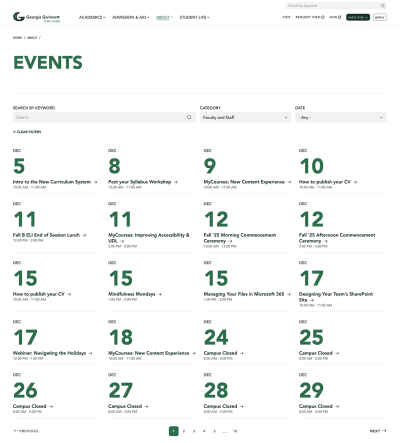
The 25Live system also offers an option to add events to the GGC calendar to help boost visibility and attendance. Faculty and staff can also add event flyers to the calendar request. Refer to the “Guide to Adding Events to the GGC Calendar Using 25Live (PDF)” for detailed instructions.
For more information on 25Live, contact ssattler [at] ggc.edu (Steven Sattler).
References
- Communications Requests webpage
- Guide to adding events to the GGC calendar using 25Live
- Centralizing campus events in the college master calendar
- Event description guidelines and samples for master calendars